

Shopware 6
Buckaroo is a certified Shopware Technology Partner, and the Buckaroo extension connects your Shopware 6 store to the Buckaroo payment gateway. You configure it from the extension's own configuration screen in the administration, per sales channel.
Cards can be offered through Hosted Fields, which keeps card entry inside your own checkout rather than sending the customer to another page. Refunds and captures are handled from the order itself, and Apple Pay and PayPal Express buttons can be placed on your product and cart pages so customers can pay without going through the full checkout.
Requirements
You need a Buckaroo account. Request one here if you do not have one yet.
The Shopware, PHP and Composer versions the extension supports are listed on the repository and with each release. Checking there rather than here means you are reading the requirements for the version you are about to install.
No administration rebuild is needed. The extension ships pre-built administration assets, so there is no build command to run after installing or updating.
What you can do with it
- Offer a wide range of local and international payment methods, each enabled and configured on its own.
- Keep card entry inside your checkout with Hosted Fields.
- Place Apple Pay, Google Pay and PayPal Express buttons on your product and cart pages.
- Charge a fee per method, either as a fixed amount or a percentage.
- Refund a whole order, a custom amount or individual line items, from the order screen.
- Capture authorised payments manually, or automatically when you ship.
- Create a payment link for an existing order.
- Configure everything per sales channel, so different channels can behave differently.
How it works
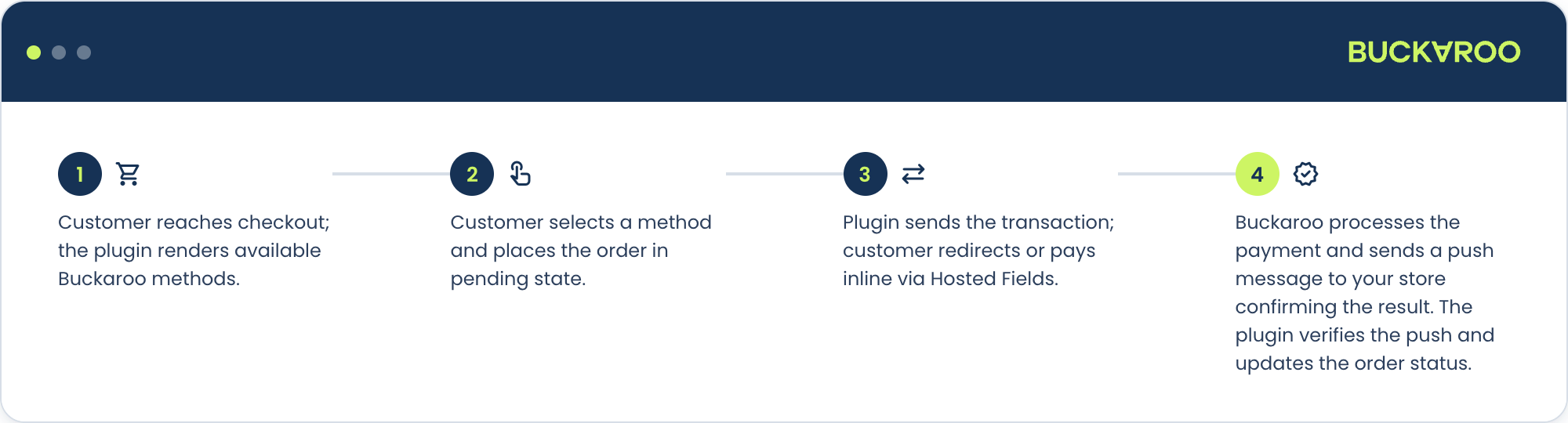
- The customer picks a Buckaroo payment method in your checkout.
- The extension sends the transaction to Buckaroo, using the credentials for that sales channel.
- The customer completes the payment, either inside your checkout or at the method's own environment.
- Buckaroo sends a push message back to your store, and the extension moves the order to its next state.
The push message is what updates the order, not the customer returning to your shop. See Push messages.
Updated 2 days ago