

Troubleshooting
Diagnose and fix the most common problems with the Buckaroo Magento 2 plugin.
Start here: enable logging
Almost every diagnosis starts with the log.
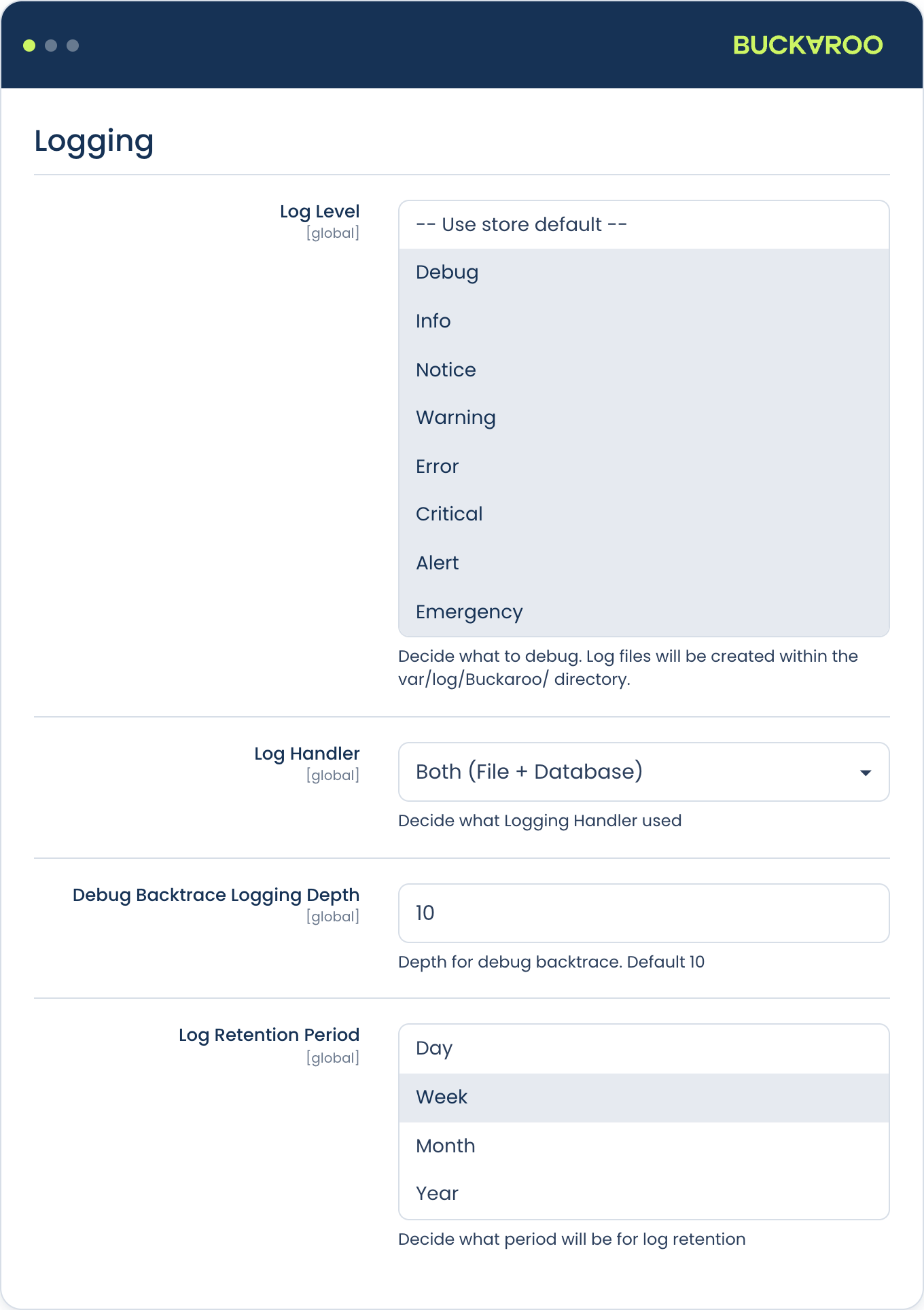
- Go to Stores → Configuration → Sales → Buckaroo → Logging.
- Set Log Level to
Debug. - Check Log Handler, which can be
File,DatabaseorBoth. It defaults to Both. - Save and flush the cache.
- Reproduce the problem.
Logs are written to a dated file per day:
var/log/Buckaroo/YYYY-MM-DD.logCritical errors are recorded separately in the same directory. If you chose Database or Both, the same entries are also queryable in the admin.
Log Retention Period controls how long entries are kept: Day, Week, Month or Year, defaulting to Week. If you're investigating something that happened a fortnight ago, the log may already have been cleaned up.
Raise the log level back when you're done. Debug logging on a busy production store fills the disk quickly and captures far more request detail than you want sitting in a file.
Buckaroo Plaza shows the other half of the picture. Under Transactions, each transaction has a full status history including the raw push messages we sent. When Magento and Plaza disagree, comparing the two tells you which side of the connection failed.
Common problems
Select a symptom to see the fix.
Orders stay in 'Pending payment' after a successful payment
By far the most common issue. The payment succeeded at Buckaroo but the push message never reached Magento, or was rejected.
Start in Plaza, not Magento. Open the transaction and look at the Logs tab. It shows every push attempt and the response your server gave, which tells you straight away which half of the connection failed.
If the pushes failed with a timeout or connection error, the request never reached your store:
- Are Buckaroo's IPs allowlisted? A firewall, WAF or hosting-level IP allowlist blocking them is the single most common cause. Check the current list against your rules. If the allowlist was set up a while ago, an address may have been added since.
- Are the required ports open for inbound traffic from those addresses?
- Is the store behind basic auth? Common on staging. Buckaroo can't authenticate.
- Is the route cached? Varnish or a CDN in front of the plugin's routes will break it. See Installation.
If Plaza shows the pushes being delivered successfully but Magento didn't act on them:
- Do the Secret keys match? If the key in Magento differs from the one in Plaza, the signature check fails and the push is discarded. This often happens after a key is regenerated in one place but not the other.
- Check
var/log/Buckaroo/with the log level set to Debug. A rejected push is logged.
You don't need to check the push URL. The plugin sends it with every transaction request, so it can't be misconfigured.
Once you've fixed the cause, you don't have to chase the affected orders manually. Buckaroo retries for up to 18 hours, so recent orders may resolve themselves. For older ones, resend from Plaza: open the transaction and use Actions, or use Transactions → Overview → Filters → Actions → Bulk Push to resend a batch.
While you're investigating, it can help to switch on push failure emails in Plaza under Settings → Stores → Push settings → E-mail push failure. It notifies you on the first failed attempt, which is noisy for everyday use but exactly what you want while chasing a problem.
A payment method doesn't appear in checkout
Work down this list:
- Is the method set to Live or Test, not
Off? - Is the method active on your Buckaroo contract? Check Plaza.
- Does the cart total fall within the method's minimum and maximum order amount?
- Does the customer's billing country match the allowed countries?
- Is the customer in an allowed customer group?
- Are you looking at the right store view? Configuration is scoped.
- Have you flushed the cache since changing the configuration?
- For Apple Pay: is your domain verified, and are you on a supported browser and device?
Payments fail immediately
Usually credentials.
- Confirm the Store key and Secret key are correct and have no leading or trailing whitespace. Copy-paste from Plaza often picks up a trailing space.
- Confirm you're using keys from the right Buckaroo account and website.
- Check the log for the error returned by the gateway; it's usually specific.
Refunds fail
- Is Refund enabled in the Buckaroo configuration?
- Did you use Refund rather than Refund Offline? Refund Offline doesn't send anything to Buckaroo.
- Does the method support refunds? Most do. See Order management.
- Is the original transaction settled? Some methods can't be refunded until settlement.
- Has the order already been refunded in Plaza? A double refund will be rejected.
Cards are declined
Decline reasons come from the issuing bank, not from Buckaroo or Magento. The specific code is visible in Plaza under the transaction. See Decline codes for what each one means. "Do Not Honor" in particular is more nuanced than it sounds.
Second Chance emails aren't sending
Second Chance depends on Magento cron. The plugin schedules a check every two minutes, but only if cron runs. Verify it:
php bin/magento cron:run --group=defaultIf manually running cron sends the emails, your scheduled cron isn't configured correctly.
Something broke after an upgrade
- Check the release notes for the versions you moved through. A breaking change may be documented.
- Re-run the setup commands, including
setup:di:compile, and flush the cache. - Confirm the Magento and PHP versions are still in the supported range.
- If you've customised the plugin, check whether your customisation targets code that changed.
The checkout looks broken after installing
Usually stale static content or an uncompiled DI cache:
php bin/magento setup:upgrade
php bin/magento setup:di:compile
php bin/magento setup:static-content:deploy
php bin/magento cache:flush
Clear the cache
A surprising number of "the setting didn't apply" problems are cache. Under System → Cache Management, select Flush Magento Cache, or:
php bin/magento cache:flushContact support
Still stuck? Tell us what you expected to happen and what happened instead, and add whatever else applies:
- Your Magento order number, if the issue involves an order
- The Buckaroo transaction key, if a payment is involved. You will find it on the transaction in Plaza
- The payment method, and whether it was live or test
- A screenshot, if something looks wrong rather than behaves wrong
Never share your secret key, with us or with anyone else. Support never needs it.
You can find our contact details on the Contact us page.
Buckaroo status
Stay up to date with the current status of Buckaroo’s services and APIs. Check this page for real-time information about ongoing incidents, maintenance, and service availability.
Updated 22 days ago