

Pay-ins
A Mirakl order can contain products from several sellers.
The customer pays the whole basket in one payment at the marketplace checkout. Buckaroo processes that payment as a split payment: it divides the amount between the sellers in the order and the operator. Each seller's share is held in that seller's Buckaroo account until it is paid out.
Your storefront starts the payment. The connector takes over once the payment is linked to the Mirakl order. It then handles refunds, cancellations and payouts.
Payment flow
sequenceDiagram
    autonumber
    actor Customer
    participant Store as Operator storefront
    participant BCK as Buckaroo
    participant Mirakl
    participant Conn as Buckaroo for Mirakl

    Customer->>Store: Checks out a multi-seller basket
    Store->>Mirakl: Creates the order (one order per seller)
    Store->>Mirakl: Reads buckaroo-id of each seller's shop
    Store->>BCK: Split payment request (Marketplaces / Split)<br/>one Seller group per seller
    BCK-->>Customer: Payment page (iDEAL | Wero, cards, ...)
    Customer->>BCK: Pays
    BCK-->>Store: Push message: payment successful + transaction key
    Store->>Mirakl: Writes transaction key to order field buckaroo-transaction-id
    Store->>Mirakl: Confirms payment of the order
    Note over BCK: Seller shares are reserved<br/>in the seller accounts
    Conn->>Mirakl: Hourly: reads orders, refunds and accounting documents
What your checkout does
- Create the order in Mirakl. Mirakl creates one order for each seller in the basket.
- Look up the sellers. Read the shop additional field
buckaroo-idof every seller in the basket. It holds
the seller's Buckaroo account ID and is filled by the connector once the seller is approved
(see Seller KYC). Only sell products from sellers whosebuckaroo-idis filled. - Start a split payment. Send a transaction request with the
Marketplacesservice and theSplitaction.
Add oneSellergroup per seller, with the seller'sbuckaroo-idasAccountIdand the seller's amount, and
aMarketplacegroup for the operator's share if any. See
Split Payments requests. - Handle the push message. Buckaroo sends a push message to the push URL of your store in Plaza when the
payment status changes. See Push messages. - Link the payment to the order. When the payment is successful, write the Buckaroo transaction key to
the order additional fieldbuckaroo-transaction-idon every Mirakl order that the payment covers. Then
confirm the payment of the orders in Mirakl.
ImportantThe connector only processes refunds and cancellations for orders that have a
buckaroo-transaction-id. Write the transaction key before the seller can accept, refund or cancel the order.
Example
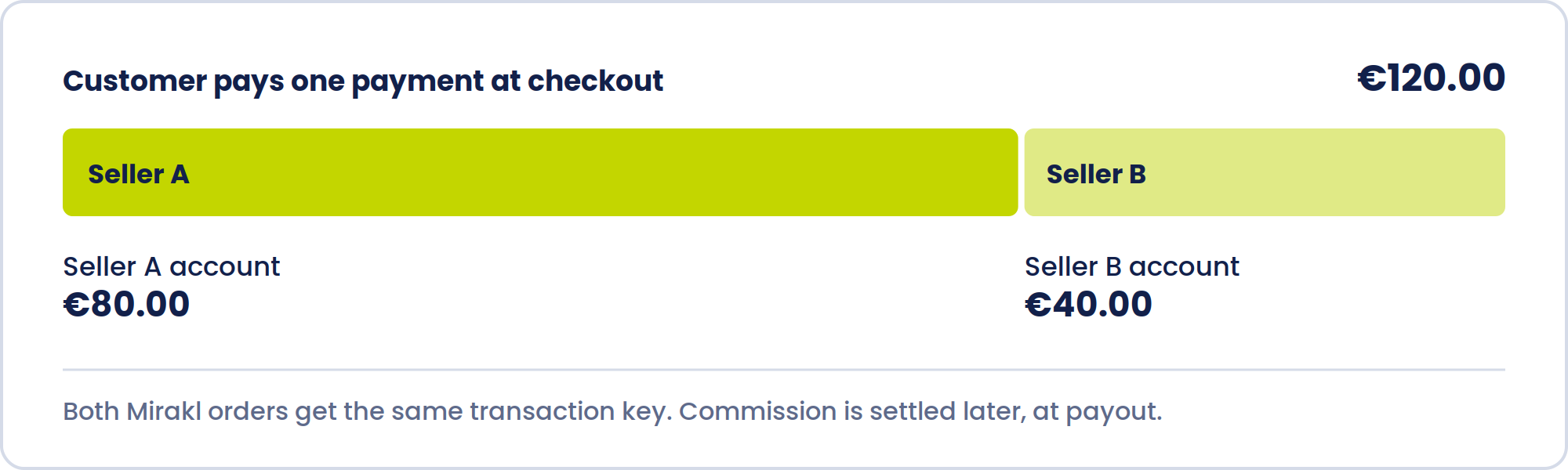
A customer buys a jacket from seller A (€80) and a lamp from seller B (€40) and pays €120 with iDEAL | Wero.
| Mirakl | Buckaroo | |
|---|---|---|
| Orders | Order 1001-A (seller A, €80), order 1001-B (seller B, €40) | One iDEAL | Wero payment of €120 |
| Split | Seller A account €80, seller B account €40 | |
| Link | Both orders get buckaroo-transaction-id = the transaction key |
Commission is not deducted at this point. Mirakl calculates it in its billing cycle, and it is settled at
payout (see Payouts).
Refunds and cancellations
Refunds and cancellations are made in Mirakl as usual, by the seller or the operator.
The connector picks them up and refunds the customer through Buckaroo. You don't need to do anything in Plaza.
sequenceDiagram
    autonumber
    actor Seller
    participant Mirakl
    participant Conn as Buckaroo for Mirakl
    participant BCK as Buckaroo
    actor Customer

    Seller->>Mirakl: Refunds an order line (or cancels the order)
    Conn->>Mirakl: Hourly: orders with refunds or cancellations, updated in the last 3 days
    Conn->>Conn: Skips lines that were already processed and lines of €0
    Conn->>BCK: Partial refund on the original transaction<br/>Seller: amount − commission<br/>Operator: commission
    BCK-->>Customer: Refund to the original payment method
    Conn->>Conn: Records the lines as processed
How a refund is divided:
| Part | Amount | Taken from |
|---|---|---|
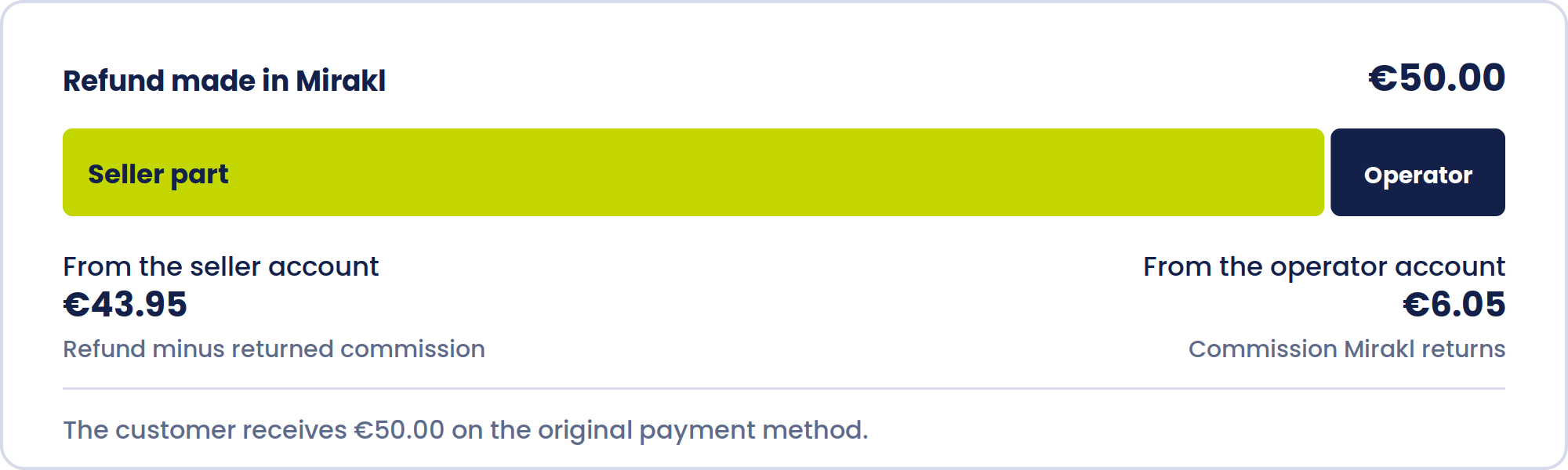
| Seller | Refund amount − refunded commission (incl. tax) | Seller's Buckaroo account |
| Operator | Refunded commission (incl. tax), as calculated by Mirakl | Operator's Buckaroo account |
For example, a refund of €50 on which Mirakl returns €6.05 commission is refunded as €43.95 from the seller and €6.05 from the operator. The customer receives €50.
How the connector decides whether to refund a line:
flowchart TD
    A["Order with refund or cancellation<br/>updated in the last 3 days"] --> B{"Order has<br/>buckaroo-transaction-id?"}
    B -- no --> X1["Ignored"]
    B -- yes --> C{"Line amount > €0?"}
    C -- no --> X2["Skipped"]
    C -- yes --> D{"Line already<br/>processed?"}
    D -- yes --> X3["Skipped"]
    D -- no --> E["Partial refund at Buckaroo"]
    E --> F{"Accepted?"}
    F -- yes --> G["Line recorded as refunded"]
    F -- no --> H["Line recorded as failed<br/>Buckaroo alerted"]
The connector sends a refund to Buckaroo within about an hour of it being made in Mirakl.
It checks orders updated in the last 3 days, so a refund that hasn't gone through after that is no longer picked up.
Each refunded or cancelled order line is refunded on its own. That covers partial refunds, and a full
refund is a refund of every line. A line is refunded once, however often the connector runs.
If Buckaroo rejects a refund, the line is marked as failed and Buckaroo is alerted.
Failed refunds aren't retried automatically, so contact Buckaroo support.
Updated 4 minutes ago