

Seller KYC
A seller can't receive money until Buckaroo has verified them. As a licensed payment service provider,
Buckaroo has to identify every seller (Know Your Customer, KYC). The connector starts that process for each new shop in Mirakl and keeps the shop's KYC status up to date.
Sellers enter their details once, in Mirakl. They then complete the remaining steps, such as identity
verification and documents, directly with Buckaroo.
Onboarding flow
sequenceDiagram
    autonumber
    actor Seller
    participant Mirakl
    participant Conn as Buckaroo for Mirakl
    participant BCK as Buckaroo onboarding

    Seller->>Mirakl: Creates a shop and enters company, bank and contact details
    Note over Mirakl: KYC status PENDING_SUBMISSION
    Conn->>Mirakl: Hourly: shops with KYC status PENDING_SUBMISSION
    Conn->>Conn: Checks that IBAN and phone number are present
    Conn->>BCK: Submits the onboarding request
    BCK-->>Conn: Onboarding reference
    Conn->>Mirakl: KYC status PENDING_APPROVAL
    BCK-->>Seller: E-mail with link to complete onboarding
    Seller->>BCK: Verifies identity, uploads documents
    BCK->>BCK: Review
    loop Every hour until approved
        Conn->>BCK: Requests onboarding status
        BCK-->>Conn: Status (+ Buckaroo account ID)
        Conn->>Mirakl: Updates KYC status and buckaroo-id
    end
    Note over Mirakl: KYC status APPROVED
Information sellers provide in Mirakl
The connector reads the following from the Mirakl shop and sends it to Buckaroo.
Make these fields mandatory in your Mirakl seller registration.
| Information | Where in Mirakl | Required |
|---|---|---|
| Company (corporate) name | Shop › Professional details | Yes |
| Chamber of Commerce (registration) number | Shop › Professional details › Identification number | Yes |
| VAT number | Shop › Professional details › Tax identification number | Yes |
| Registered address: street and number, postal code, city, country | Shop › Billing information › Registration address | Yes |
| IBAN | Shop › Payment information | Yes, onboarding is blocked without it |
| Bank account holder name | Shop › Payment information › Owner | Yes |
| Contact first name, last name, e-mail | Shop › Contact information | Yes |
| Contact phone number | Shop › Contact information | Yes, onboarding is blocked without it |
| Website | Shop › Contact information › Website | Recommended |
Enter the website without https://. The connector adds it.
Buckaroo asks the seller for anything else, such as ultimate beneficial owners (UBOs), identity documents
and a Chamber of Commerce extract, directly during onboarding.
KYC statuses in Mirakl
| Buckaroo onboarding status | Mirakl shop KYC status | Meaning |
|---|---|---|
| Not yet submitted | PENDING_SUBMISSION | The shop is waiting to be submitted, or data is missing |
| Submitted, waiting for the seller or for review | PENDING_APPROVAL | The seller has to complete onboarding at Buckaroo, or Buckaroo is reviewing |
| Activated | APPROVED | The seller account is active. The seller can receive payments and payouts. |
| No onboarding or review needed | NOT_REQUIRED | Buckaroo doesn't need a review for this seller |
| Rejected | REFUSED | Buckaroo could not approve the seller |
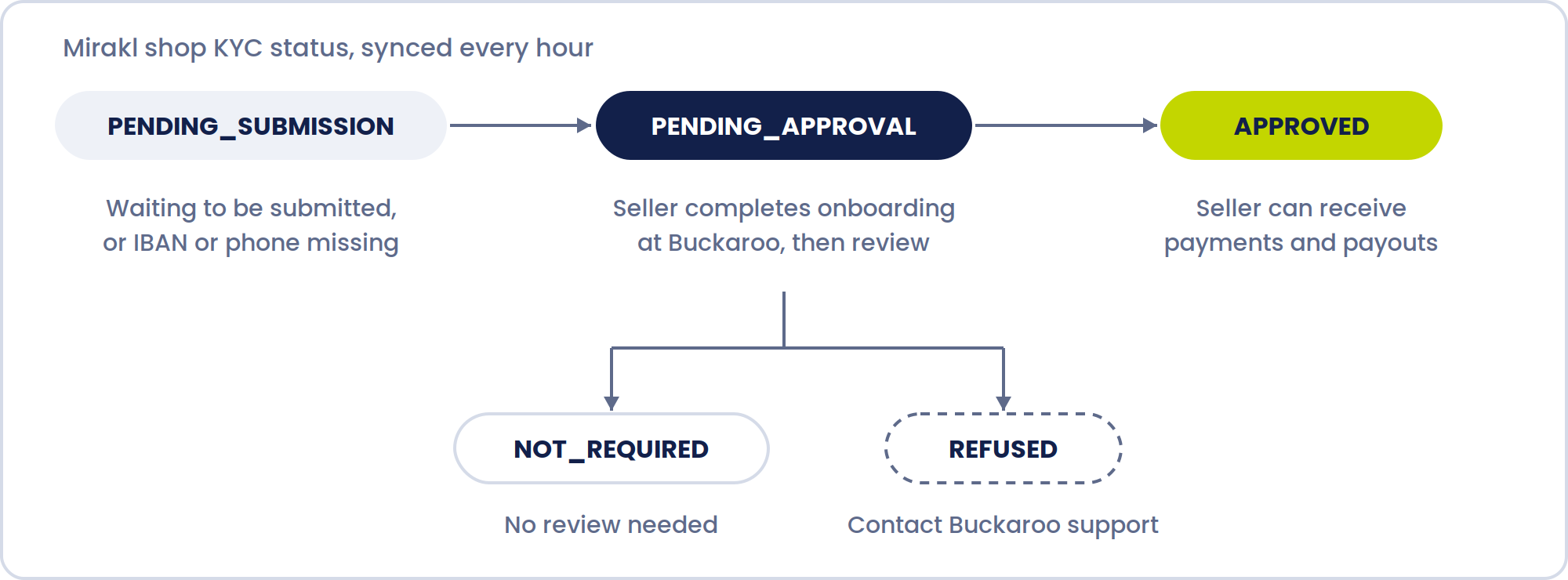
Statuses are synced every hour.
The Buckaroo account ID of the seller is written to the shop additional field buckaroo-id as soon as Buckaroo creates the account. Your checkout uses this ID to split payments to the seller.
Things to know
A shop without an IBAN or phone number stays in PENDING_SUBMISSION.
It's submitted on the first run after the seller fills them in.
Each shop is submitted to Buckaroo once. If the seller changes their details in Mirakl afterwards, Buckaroo
doesn't see the change, so the seller has to pass it on during onboarding or to Buckaroo support.
A refused shop isn't resubmitted either.
Contact Buckaroo support to have the case reviewed or the onboarding restarted.
Only put products from sellers with KYC status APPROVED and a filled buckaroo-id in a split payment.
Without an account ID, Buckaroo has nowhere to send the seller's share.
Updated 9 minutes ago